 Cem Kiray's Page
 Table of contents
Open Table of contents
JSON-LD Schema for Better SEO in Astro Pages
I started blogging recently (see: About my blog) and I wanted to improve the SEO of my blog. I realized that one effective way to improve SEO is to add JSON-LD schema to the website. JSON-LD (JavaScript Object Notation for Linked Data) is a method of encoding linked data using JSON. It helps search engines better understand the content and structure of the site, leading to improved search rankings and richer search results.
In this tutorial, we will see the steps to add JSON-LD schema to your Astro pages.
As an example, see how GitHub appears on Google search results:
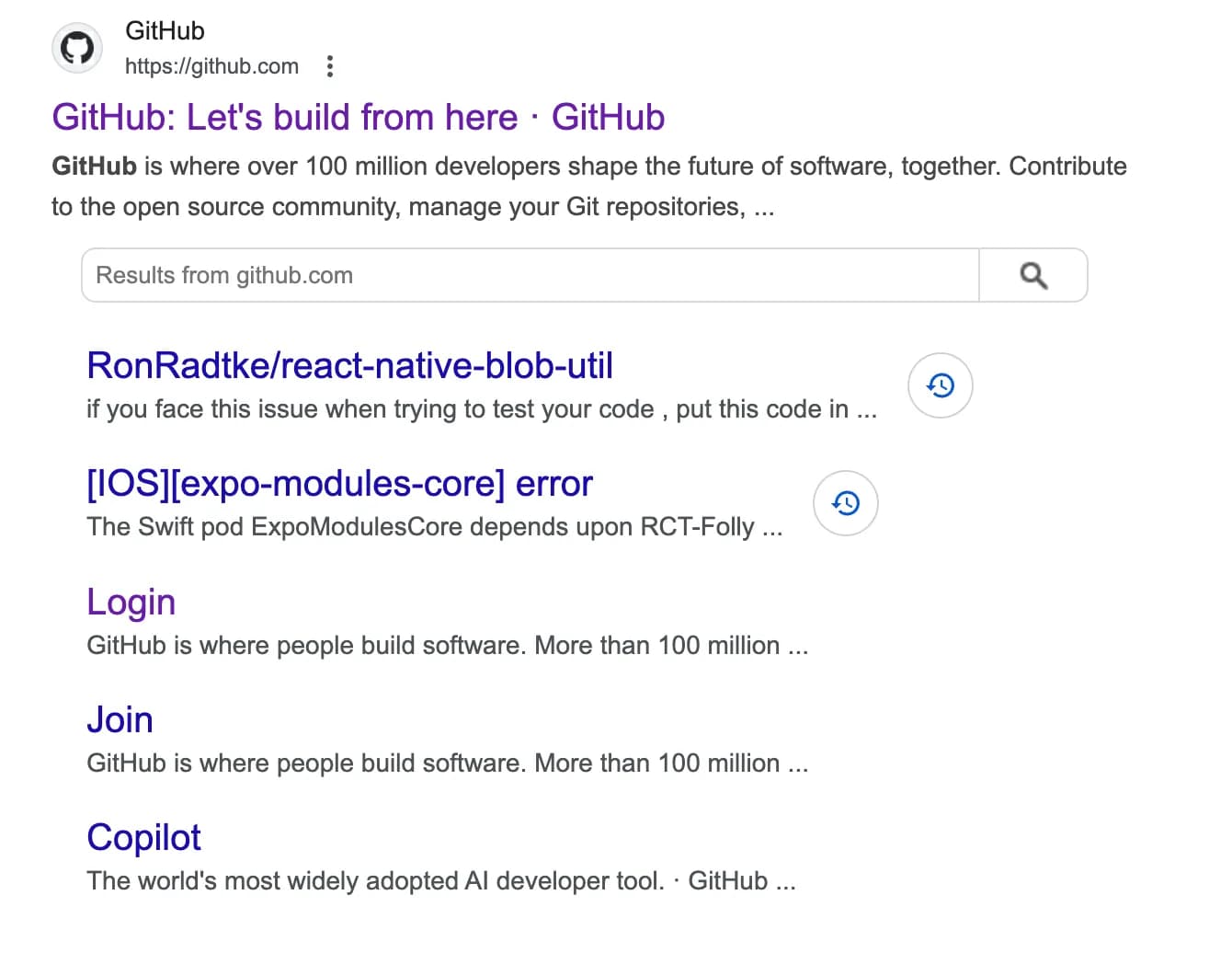 This is an example of “rich search results” that are enhanced with structured schemas.
Adding JSON-LD Schema to Your Blog Post Template
You can learn more about JSON-LD schema from the JSON-LD website.
For now, I will be adding two types of JSON-LD data to my Astro website:
- JSON-LD schema for the blog posts itself (type:
"@type": "BlogPosting") - JSON-LD schema for the website with search action (type:
"@type": "SearchAction")
Our primary goal is to include these JSON-LD schemas in our element for each page.
We have a html element for this purpose. It is called <script type="application/ld+json">. We will use this element to include JSON-LD data for our blog post and website.
I have a Layout.astro file that includes the common layout for all pages. I will add the JSON-LD schema to this file. Your Astro project may have a different structure, so adjust the following steps accordingly.
Here’s the simple way I used to include JSON-LD data for my pages:
---
import {
  title,
  description,
  author,
  socialImageURL,
  pubDatetime,
  modDatetime,
  canonicalURL,
} from "../path/to/your/data";

// Construct JSON-LD data for the blog post
const blogJsonLd = pubDatetime && {
  "@context": "https://schema.org",
  "@type": "BlogPosting",
  mainEntityOfPage: {
    "@type": "WebPage",
    "@id": canonicalURL,
  },
  headline: title,
  description: description,
  image: socialImageURL,
  author: {
    "@type": "Person",
    name: author,
    url: "https://www.cemkiray.com",
  },
  publisher: {
    "@type": "Person",
    name: author,
    logo: {
      "@type": "ImageObject",
      url: "https://www.cemkiray.com/favicon.ico",
    },
  },
  datePublished: pubDatetime.toISOString(),
  dateModified: modDatetime?.toISOString(),
};

// Construct JSON-LD data for the website with search action
const searchJsonLd = {
  "@context": "https://schema.org",
  "@type": "WebSite",
  name: "Cem Kiray's Blog",
  url: "https://www.cemkiray.com",
  logo: "https://www.cemkiray.com/favicon.ico",
  sameAs: [
    "https://twitter.com/jamcry",
    "https://www.linkedin.com/in/cemkiray",
    "https://github.com/jamcry",
  ],
  potentialAction: {
    "@type": "SearchAction",
    target: "https://www.cemkiray.com/search/?q={search_term_string}",
    "query-input": "required name=search_term_string",
  },
};
---

<html>
  <head>
    <title>{title}</title>
    {
      blogJsonLd && (
        <script
          type="application/ld+json"
          set:html={JSON.stringify(blogJsonLd)}
        />
      )
    }
    <script
      type="application/ld+json"
      set:html={JSON.stringify(searchJsonLd)}
    />
  </head>
  <body>
    <!-- The rest of the content -->
  </body>
</html>
Explanation
-
Inline JSON-LD for Blog Post: We check if
pubDatetimeis defined to determine if it’s a blog post detail page. If so, we construct the JSON-LD data for the blog post, including details like the title, description, author, and publication dates. If you have a separate layout.astrofile for your blog post template, you might want to include the JSON-LD data there. -
Inline JSON-LD for Site Search Functionality: Separately, we define JSON-LD data for the website itself, including a SearchAction schema to describe the search functionality. This schema helps search engines understand how users can search your site, potentially improving the search experience.
  potentialAction: {
    "@type": "SearchAction",
    "target": "https://www.cemkiray.com/search/?q={search_term_string}",
    "query-input": "required name=search_term_string",
}- set:html Attribute: We use the set:html attribute to set the inner HTML of the
<script>tag with the result of our mini JavaScript code:JSON.stringify(...)that returns JSON-LD data. This attribute is a powerful feature of Astro that allows you to dynamically set HTML content based on JavaScript values.
How to Test JSON-LD Schema
After implementing the changes. You can use Google’s Structured Data Testing Tools to validate the JSON-LD schema on your Astro site. Simply enter the URL of your blog or copy-paste your HTML code with the JSON-LD data to check for any errors or warnings.
Why use JSON-LD for SEO?
Adding JSON-LD schema to your website can significantly enhance your SEO efforts by:
- Improving Search Visibility: Helps search engines better understand and index your content.
- Enhancing Search Results: Enables rich snippets, such as article headlines, publication dates, and authors, to appear in search results.
- Structuring Data: Provides a clear structure of your content, which is beneficial for both search engines and other data parsers.
By following these steps, you can ensure that your Astro blog posts and site search functionality are well-optimized for search engines with structured data using JSON-LD. This will help improve your site’s visibility and potentially attract more visitors.
Extra: How to Add JSON-LD Schema to HTML (or others)
Although this post focuses on Astro, you can apply the same principles to other static site generators or frameworks. The key is to include the JSON-LD data in the <head> element of your HTML pages using the <script type="application/ld+json"> element.
2026 Update: Try FAQ Type if Applicable
If your blog post or page content is suitable for inserting “frequently asked questions (FAQ)” section, consider adding an FAQPage schema to your JSON-LD structured data. FAQ schema has become increasingly important for both traditional search engines and AI-powered search tools like ChatGPT, Perplexity, and Google’s AI Overviews.
Benefits of adding FAQ schema:
- Rich Snippets in Search Results: Google and other search engines can display your FAQs directly in search results as expandable accordions, increasing visibility and click-through rates.
- AI Search Optimization: AI assistants and chatbots increasingly parse structured data like
FAQPageschema to provide direct answers to user queries. Your content can be featured in AI-generated responses. - Featured Snippet Opportunities: Questions from your FAQ can appear as featured snippets at the top of search results.
When to add FAQ schema:
- Blog posts with a dedicated FAQ section
- Tutorial pages with common questions
- Product pages addressing customer queries
- Documentation with troubleshooting questions
You can easily implement this by adding an faqs array to your Astro frontmatter, then generating the JSON-LD programmatically in your layout. Refer to Adding JSON-LD Schema to Your Blog Post Template section to see an example.
Reach me out on one of the links at the footer!