 Cem Kiray's Page
 I published oneshotcam almost a week ago now. It’s a Expo React Native iOS app that brings back the nostalgia of disposable cameras to our mobile phones.
The app uses Sentry as the error handling service, and a weird looking error started popping up in my Sentry dashboard: “WatchdogTermination: The OS watchdog terminated your app, possibly because it overused RAM.”.
As a developer, seeing “terminated” and “overused RAM” in the same sentence is usually a sign to panic. I spent some time trying to understand why a relatively simple retro camera app would be eating up so much memory and causing “WatchdogTermination” errors.
In this post, I’ll share what I found out about this watchdog error, why it happens, and why you probably don’t need to worry about it.
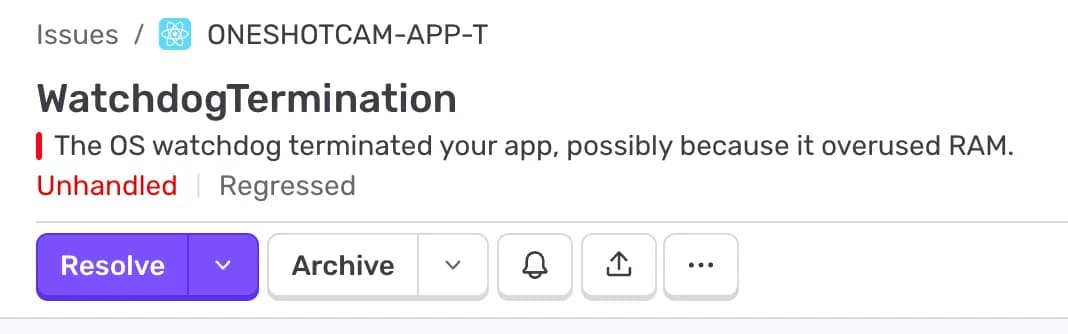
Table of Contents
Open Table of Contents
Why “The OS watchdog terminated your app” Error Happens?
First let’s start with “what is watchdog”. The iOS operating system employs a “watchdog” daemon that monitors apps to ensure they aren’t hogging resources or freezing the user interface.
Technically, a watchdog timeout occurs when your application blocks the main thread for too long. iOS expects your app to be responsive. If your app takes too long to launch, resume, or respond to system events, the watchdog steps in and kills the process.
While the error message in Sentry specifically mentions “overused RAM,” this message is often a generic message for watchdog terminations. (Apple loves to confuse us, develepors, see: How to Fix Apple Developer Program “Unknown Error Occurred”) In React Native apps, this can happen if:
- Heavy Computation on Startup: You are doing too much synchronous work on the JavaScript thread during the app launch.
- Memory Spikes: You are overloading the memory, for example you might be loading massive images, trying to parse long base64 strings into memory all at once. Or it might simply be a bad usage of
useEffecthooks that causes memory leaks. - Deadlocks: The main thread is waiting for a background thread that never finishes.
However, in my case, none of these existed. If like me, you can’t reproduce this crash on your simulator or test device, and your memory usage looks normal in the Xcode profiler, something else might be going on.
The App Store Review “Crash” Theory
Here is the interesting part. I noticed a pattern: these errors were flooding in exactly when my app was “In Review” by Apple.
After digging through forums and GitHub issues, I found I wasn’t alone. Many React Native developers report seeing this exact error during the App Store submission process.
The Theory: When Apple’s automated bots (crawlers) or human reviewers are finished testing your app, they don’t always close it gracefully. It seems they might be using an automated harness that force-kills the app or simulates extreme conditions to test stability.
If the reviewer or the bot terminates the app session aggressively, or if the automated environment has extremely strict memory/time limits compared to a real device, the OS watchdog interprets this as a crash and reports it. Sentry, doing its job, catches this termination and flags it as an issue.
Conclusion / TLDR
TLDR: If you recently sent a React Native iOS build to App Store for a review, the “The OS watchdog terminated your app, possibly because it overused RAM” error is probably harmless.
It typically happens when the App Store reviewers (or their automated bots) finish their review and kill the app programmatically. If you aren’t seeing this crash from real users in production and can’t reproduce it yourself, it’s likely just noise from the review process.
So, don’t panic. Wait until your app is live and see if real users face the issue. Chances are, your memory management is just fine.
❓ Frequently Asked Questions (FAQ)
What is a watchdog timeout in iOS?
A watchdog timeout happens when the OS terminates an app because it failed to respond to the system within a pre-defined time limit (usually around 20 seconds for launch).
Should I ignore this error completely?
Not necessarily. If you see this error coming from real users in production (not during App Store review), you definitely have a performance issue to investigate. It usually means your app is blocking the UI thread or leaking memory.
How can I fix a real watchdog termination?
If the error is real, try to move heavy computations off the main thread, optimize your image assets, and ensure your app’s startup logic in AppDelegate (or your root component in React Native) is as lightweight as possible.
Reach me out on one of the links at the footer if you have other theories!